 آموزش برنامه نویسی اندروید |
آموزش ارسال ایمیل در برنامه نویسی اندروید
سلام دوستان در این سری از آموزش برنامه نویسی اندروید به آموزش ارسال ایمیل در برنامه نویسی اندروید می پردازیم در ارسال ایمیل از برنامه های واسط استفاده می شود یعنی با استفاده از EditText ها ورودی را کاربر گرفته سپس با استفاده از Intent ها را به برنامه های دیگر پاس میدیم در ادامه با ما همراه باشید.
ابتدای کار شما باید یکسری EditText برای دریافت ورودی از کاربر قرار دهید پس در فایل activity_main.xml کد های زیر را قرار دهید.
<?xml version="1.0" encoding="utf-8"?>
<RelativeLayout xmlns:android="http://schemas.android.com/apk/res/android"
    xmlns:tools="http://schemas.android.com/tools"
    android:layout_width="match_parent"
    android:layout_height="match_parent"
    tools:context=".MainActivity">
    <TextView
        android:layout_width="wrap_content"
        android:layout_height="wrap_content"
        android:textSize="18dp"
        android:text="To"
        android:id="@+id/textView"
        android:layout_alignParentTop="true"
        android:layout_alignParentLeft="true"
        android:layout_alignParentStart="true" />
    <EditText
        android:layout_width="fill_parent"
        android:layout_height="wrap_content"
        android:id="@+id/editText"
        android:layout_below="@+id/textView"
        android:layout_centerHorizontal="true"
        />
    <TextView
        android:layout_width="wrap_content"
        android:layout_height="wrap_content"
        android:textSize="18dp"
        android:text="Subject"
        android:id="@+id/textView2"
        android:layout_below="@+id/editText"
        android:layout_alignParentLeft="true"
        android:layout_alignParentStart="true" />
    <EditText
        android:layout_width="fill_parent"
        android:layout_height="wrap_content"
        android:id="@+id/editText2"
        android:layout_below="@+id/textView2"
        android:layout_centerHorizontal="true" />
    <TextView
        android:layout_width="wrap_content"
        android:layout_height="wrap_content"
        android:textSize="18dp"
        android:text="Message"
        android:id="@+id/textView3"
        android:layout_below="@+id/editText2"
        android:layout_alignParentLeft="true"
        android:layout_alignParentStart="true" />
    <EditText
        android:layout_width="fill_parent"
        android:layout_height="wrap_content"
        android:inputType="textMultiLine"
        android:lines="4"
        android:id="@+id/editText3"
        android:layout_below="@+id/textView3"
        android:layout_centerHorizontal="true" />
    <Button
        android:layout_width="wrap_content"
        android:layout_height="wrap_content"
        android:text="Send Email "
        android:id="@+id/button"
        android:layout_below="@+id/editText3"
        android:layout_centerHorizontal="true"
        android:layout_marginTop="44dp" />
</RelativeLayout>
کد بالا شکل زیر را برای شما ایجاد می کند.
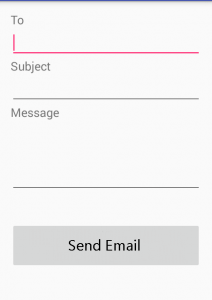
همانطور که دیدید فیلد اول شما باید ایمیل را وارد کنید subject عنوان را ارسال می کند و message هم متن پیام می شود.
و کد مربوط به MainActivity.java همانند زیر می شود.
package ir.programchi;
import android.content.Intent;
import android.support.v7.app.AppCompatActivity;
import android.os.Bundle;
import android.view.View;
import android.widget.Button;
import android.widget.EditText;
import android.widget.TextView;
public class MainActivity extends AppCompatActivity {
    EditText editextTo, edittextSubject, edittextMessage;
    Button button1;
    String TO, SUBJECT, MESSAGE ;
    Intent intent ;
    @Override
    protected void onCreate(Bundle savedInstanceState) {
        super.onCreate(savedInstanceState);
        setContentView(R.layout.activity_main);
        editextTo = (EditText)findViewById(R.id.editText);
        edittextSubject = (EditText)findViewById(R.id.editText2);
        edittextMessage = (EditText)findViewById(R.id.editText3);
        button1 = (Button)findViewById(R.id.button);
        button1.setOnClickListener(new View.OnClickListener() {
            @Override
            public void onClick(View v) {
                GetData();
                intent = new Intent(Intent.ACTION_SEND);
                intent.putExtra(Intent.EXTRA_EMAIL, new String[]{TO});
                intent.putExtra(Intent.EXTRA_SUBJECT, SUBJECT);
                intent.putExtra(Intent.EXTRA_TEXT, MESSAGE);
                intent.setType("message/rfc822");
                startActivity(Intent.createChooser(intent, "Select Email Sending App :"));
            }
        });
    }
    public void GetData(){
        TO = editextTo.getText().toString() ;
        SUBJECT = edittextSubject.getText().toString();
        MESSAGE = edittextMessage.getText().toString();
    }
}
زمانی که بروی دکمه کلیک می شود ابتدا محتوای وارد شده در EditText دریافت می شود سپس توسط inten به اپ ها دیگر برای ارسال ایمیل ارسال می شود.
این آموزش هم به پایان رسید.
موفق و موید باشید.



سلام
در قسمت To باید ایمیل کاربر وارد بشه یا خودمون باید توی لایوت مان ایمیل خودمون را وارد کنیم ؟
ایمیلی شخصی که می خواهید به آن ایمیل ارسال کنید.