 آموزش برنامه نویسی اندروید |
آموزش دانلود فایل با استفاده از کتاب خانه Retrofit در برنامه نویسی اندروید
سلام دوستان در این سری از آموزش های برنامه نویسی اندروید به آموزش دانلود فایل با استفاده از کتاب خانه Retrofit در برنامه نویسی اندروید می پردازیم.قبلتر آموزش دانلود فایل از وب سرور را در سایت قرار داده بودیم اما در این بار این آموزش را با استفاده از کتاب خانه قدرتمند Retrofit به پیش می بریم با ما همراه باشید.
ابتدا باید ما از کتاب خانه Butter Knife را در Build Gradle بخش Top leve و class زیر را قرار دهید.
classpath 'com.neenbedankt.gradle.plugins:android-apt:1.8'
سپس وارد بخش Moudle رفته و خط زیر را اضافه کنید.
apply plugin: 'com.neenbedankt.android-apt'
سپس وارد بخش Build.gradle رفته بخش Moudle سپس خط های زیر را اضافه کنید
compile 'com.android.support:design:23.4.0'
compile 'com.squareup.retrofit2:retrofit:2.0.2'
compile 'com.jakewharton:butterknife:8.0.1'
apt 'com.jakewharton:butterknife-compiler:8.0.1'
سپس sync را بزنید تا پروژه sync شود قبلتر هم علت sync نشدن هم برای شما گفته بودیم کافی است سرچ کنید (دلایل بسیار زیادی وجود دارد که از حوصله این بحث خارج است.)
فایل Activity_main.xml را باز کرده کد های زیر را در آن قرار دهید.
<?xml version="1.0" encoding="utf-8"?>
<android.support.design.widget.CoordinatorLayout
    android:id="@+id/coordinatorLayout"
    android:layout_height="match_parent"
    android:layout_width="match_parent"
    xmlns:android="http://schemas.android.com/apk/res/android"
    xmlns:tools="http://schemas.android.com/tools">
    <RelativeLayout
        android:layout_width="match_parent"
        android:layout_height="match_parent"
        android:paddingBottom="@dimen/activity_vertical_margin"
        android:paddingLeft="@dimen/activity_horizontal_margin"
        android:paddingRight="@dimen/activity_horizontal_margin"
        android:paddingTop="@dimen/activity_vertical_margin"
        tools:context="com.learn2crack.filedownload.MainActivity">
        <android.support.v7.widget.AppCompatButton
            android:id="@+id/btn_download"
            android:layout_centerVertical="true"
            android:text="Start Download"
            android:background="@color/colorPrimary"
            android:textColor="@android:color/white"
            android:drawableLeft="@drawable/ic_download"
            android:paddingLeft="20dp"
            android:paddingRight="20dp"
            android:layout_width="match_parent"
            android:layout_height="wrap_content" />
        <ProgressBar
            android:id="@+id/progress"
            style="@style/Widget.AppCompat.ProgressBar.Horizontal"
            android:layout_marginTop="48dp"
            android:layout_below="@+id/btn_download"
            android:layout_width="match_parent"
            android:layout_height="wrap_content" />
        <TextView
            android:id="@+id/progress_text"
            android:layout_below="@+id/progress"
            android:textAlignment="center"
            android:layout_width="match_parent"
            android:layout_height="wrap_content" />
    </RelativeLayout>
</android.support.design.widget.CoordinatorLayout>
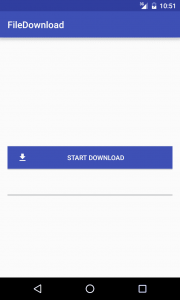
که شامل یک دکمه و progress bar و یک Textview می باشد.
حال شما باید یک کلاس ایجاد کرده و نام آن را برابر با download.java قرار دهید و کدهای زیر را آن قرار دهید.
import android.os.Parcel;
import android.os.Parcelable;
public class Download  implements Parcelable{
    public Download(){
    }
    private int progress;
    private int currentFileSize;
    private int totalFileSize;
    public int getProgress() {
        return progress;
    }
    public void setProgress(int progress) {
        this.progress = progress;
    }
    public int getCurrentFileSize() {
        return currentFileSize;
    }
    public void setCurrentFileSize(int currentFileSize) {
        this.currentFileSize = currentFileSize;
    }
    public int getTotalFileSize() {
        return totalFileSize;
    }
    public void setTotalFileSize(int totalFileSize) {
        this.totalFileSize = totalFileSize;
    }
    @Override
    public int describeContents() {
        return 0;
    }
    @Override
    public void writeToParcel(Parcel dest, int flags) {
        dest.writeInt(progress);
        dest.writeInt(currentFileSize);
        dest.writeInt(totalFileSize);
    }
    private Download(Parcel in) {
        progress = in.readInt();
        currentFileSize = in.readInt();
        totalFileSize = in.readInt();
    }
    public static final Parcelable.Creator<Download> CREATOR = new Parcelable.Creator<Download>() {
        public Download createFromParcel(Parcel in) {
            return new Download(in);
        }
        public Download[] newArray(int size) {
            return new Download[size];
        }
    };
}
اگر بخواهید بدانید که این کلاس چه کاری انجام می دهد میزان پیشرفت دانلود و اندازه سایز فایل و اندازه فعلی دانلود شده را نمایش می دهد.
برای اینکه ما بخواهیم از Retrofit استفاده کنیم باید یک کلاس ایجاد کنیم
پس کلاسی به نام RequestInterface.java ایجاد کرده کدهای زیر را در آن قرار دهید.
import okhttp3.ResponseBody;
import retrofit2.Call;
import retrofit2.http.GET;
import retrofit2.http.Streaming;
public interface RetrofitInterface {
    @GET("files/Node-Android-Chat.zip")
    @Streaming
    Call<ResponseBody> downloadFile();
}
Retrofit یک کلاس درون ساخت دارد که برای گرفتن response body
حال باید یک کلاس DownloadService ایجاد کنیم که IntentService را گسترش (Extend) کند اگر ما با استفاده از Async Task فایل را دانلود کنیم در زمانی که گوشی Rotate شود سبب interrupt در دانلود می شود.
پس یک فایل به نام DownloadService.java ایجا می کنیم و کد های زیر را در آن قرار می دهیم.
import android.app.IntentService;
import android.app.NotificationManager;
import android.content.Context;
import android.content.Intent;
import android.os.Environment;
import android.support.v4.app.NotificationCompat;
import android.support.v4.content.LocalBroadcastManager;
import android.widget.Toast;
import com.learn2crack.filedownload.models.Download;
import java.io.BufferedInputStream;
import java.io.File;
import java.io.FileOutputStream;
import java.io.IOException;
import java.io.InputStream;
import java.io.OutputStream;
import okhttp3.ResponseBody;
import retrofit2.Call;
import retrofit2.Retrofit;
public class DownloadService extends IntentService {
    public DownloadService() {
        super("Download Service");
    }
    private NotificationCompat.Builder notificationBuilder;
    private NotificationManager notificationManager;
    private int totalFileSize;
    @Override
    protected void onHandleIntent(Intent intent) {
        notificationManager = (NotificationManager) getSystemService(Context.NOTIFICATION_SERVICE);
        notificationBuilder = new NotificationCompat.Builder(this)
                .setSmallIcon(R.drawable.ic_download)
                .setContentTitle("Download")
                .setContentText("Downloading File")
                .setAutoCancel(true);
        notificationManager.notify(0, notificationBuilder.build());
        initDownload();
    }
    private void initDownload(){
        Retrofit retrofit = new Retrofit.Builder()
                .baseUrl(لینک دانلود فایل)
                .build();
        RetrofitInterface retrofitInterface = retrofit.create(RetrofitInterface.class);
        Call<ResponseBody> request = retrofitInterface.downloadFile();
        try {
            downloadFile(request.execute().body());
        } catch (IOException e) {
            e.printStackTrace();
            Toast.makeText(getApplicationContext(),e.getMessage(),Toast.LENGTH_SHORT).show();
        }
    }
    private void downloadFile(ResponseBody body) throws IOException {
        int count;
        byte data[] = new byte[1024 * 4];
        long fileSize = body.contentLength();
        InputStream bis = new BufferedInputStream(body.byteStream(), 1024 * 8);
        File outputFile = new File(Environment.getExternalStoragePublicDirectory(Environment.DIRECTORY_DOWNLOADS), "file.zip");
        OutputStream output = new FileOutputStream(outputFile);
        long total = 0;
        long startTime = System.currentTimeMillis();
        int timeCount = 1;
        while ((count = bis.read(data)) != -1) {
            total += count;
            totalFileSize = (int) (fileSize / (Math.pow(1024, 2)));
            double current = Math.round(total / (Math.pow(1024, 2)));
            int progress = (int) ((total * 100) / fileSize);
            long currentTime = System.currentTimeMillis() - startTime;
            Download download = new Download();
            download.setTotalFileSize(totalFileSize);
            if (currentTime > 1000 * timeCount) {
                download.setCurrentFileSize((int) current);
                download.setProgress(progress);
                sendNotification(download);
                timeCount++;
            }
            output.write(data, 0, count);
        }
        onDownloadComplete();
        output.flush();
        output.close();
        bis.close();
    }
    private void sendNotification(Download download){
        sendIntent(download);
        notificationBuilder.setProgress(100,download.getProgress(),false);
        notificationBuilder.setContentText("Downloading file "+ download.getCurrentFileSize() +"/"+totalFileSize +" MB");
        notificationManager.notify(0, notificationBuilder.build());
    }
    private void sendIntent(Download download){
        Intent intent = new Intent(MainActivity.MESSAGE_PROGRESS);
        intent.putExtra("download",download);
        LocalBroadcastManager.getInstance(DownloadService.this).sendBroadcast(intent);
    }
    private void onDownloadComplete(){
        Download download = new Download();
        download.setProgress(100);
        sendIntent(download);
        notificationManager.cancel(0);
        notificationBuilder.setProgress(0,0,false);
        notificationBuilder.setContentText("File Downloaded");
        notificationManager.notify(0, notificationBuilder.build());
    }
    @Override
    public void onTaskRemoved(Intent rootIntent) {
        notificationManager.cancel(0);
    }
}
تمامی بخش های کد های بالا رو همه رو توضیح داده ایم فقط یک بخش می ماند که توضیح دهیم (برای آموزش Notification builder در سایت سرچ کنید به آموزش می رسید.)
 Retrofit retrofit = new Retrofit.Builder()
                .baseUrl(لینک دانلود فایل)
                .build();
برای اینکار باید ما Url رو به بالا بدی تا دانلود شود.
بخش کد Mainactivity.java هم به شکل زیر می شود.
import android.Manifest;
import android.content.BroadcastReceiver;
import android.content.Context;
import android.content.Intent;
import android.content.IntentFilter;
import android.content.pm.PackageManager;
import android.support.design.widget.Snackbar;
import android.support.v4.app.ActivityCompat;
import android.support.v4.content.ContextCompat;
import android.support.v4.content.LocalBroadcastManager;
import android.support.v7.app.AppCompatActivity;
import android.os.Bundle;
import android.widget.ProgressBar;
import android.widget.TextView;
import com.learn2crack.filedownload.models.Download;
import butterknife.BindView;
import butterknife.ButterKnife;
import butterknife.OnClick;
public class MainActivity extends AppCompatActivity {
    public static final String MESSAGE_PROGRESS = "message_progress";
    private static final int PERMISSION_REQUEST_CODE = 1;
    @BindView(R.id.progress) ProgressBar mProgressBar;
    @BindView(R.id.progress_text) TextView mProgressText;
    @Override
    protected void onCreate(Bundle savedInstanceState) {
        super.onCreate(savedInstanceState);
        setContentView(R.layout.activity_main);
        ButterKnife.bind(this);
        registerReceiver();
    }
    @OnClick(R.id.btn_download)
    public void downloadFile(){
        if(checkPermission()){
            startDownload();
        } else {
            requestPermission();
        }
    }
    private void startDownload(){
        Intent intent = new Intent(this,DownloadService.class);
        startService(intent);
    }
    private void registerReceiver(){
        LocalBroadcastManager bManager = LocalBroadcastManager.getInstance(this);
        IntentFilter intentFilter = new IntentFilter();
        intentFilter.addAction(MESSAGE_PROGRESS);
        bManager.registerReceiver(broadcastReceiver, intentFilter);
    }
    private BroadcastReceiver broadcastReceiver = new BroadcastReceiver() {
        @Override
        public void onReceive(Context context, Intent intent) {
            if(intent.getAction().equals(MESSAGE_PROGRESS)){
                Download download = intent.getParcelableExtra("download");
                mProgressBar.setProgress(download.getProgress());
                if(download.getProgress() == 100){
                    mProgressText.setText("File Download Complete");
                } else {
                    mProgressText.setText(String.format("Downloaded (%d/%d) MB",download.getCurrentFileSize(),download.getTotalFileSize()));
                }
            }
        }
    };
    private boolean checkPermission(){
        int result = ContextCompat.checkSelfPermission(this,
                Manifest.permission.WRITE_EXTERNAL_STORAGE);
        if (result == PackageManager.PERMISSION_GRANTED){
            return true;
        } else {
            return false;
        }
    }
    private void requestPermission(){
        ActivityCompat.requestPermissions(this,new String[]{Manifest.permission.WRITE_EXTERNAL_STORAGE},PERMISSION_REQUEST_CODE);
    }
    @Override
    public void onRequestPermissionsResult(int requestCode, String permissions[], int[] grantResults) {
        switch (requestCode) {
            case PERMISSION_REQUEST_CODE:
                if (grantResults.length > 0 && grantResults[0] == PackageManager.PERMISSION_GRANTED) {
                        startDownload();
                } else {
                    Snackbar.make(findViewById(R.id.coordinatorLayout),"Permission Denied, Please allow to proceed !", Snackbar.LENGTH_LONG).show();
                }
                break;
        }
    }
}
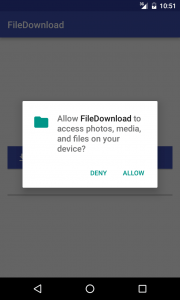
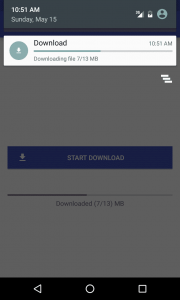
با کلیک بروی دکمه فایل شروع به دانلود شدن می کند و دقت کنید ما یک Broadcast را register می کنیم تا دقیقه به دقیقه میزان دانلود را ببینیم یعنی در هر ثانیه وضعیت در Notification نمایش می دهد و همینطور دفعه قبل RunTime Permission را توضیح داده بودیم از کاربر می خواهیم که آیا اجزا استفاده از اینترنت به ما بدهد تا فایل دانلود شود
و در آخر دسترسی های زیر را به AndroidManifest.xml اضافه کنید.
<uses-permission android:name="android.permission.INTERNET"/>
<uses-permission android:name="android.permission.WRITE_EXTERNAL_STORAGE"/>
و باید سرویسی را که تعریف کنیم آن را در اندروید Manifest تعریف کنیم
<service android:name=".DownloadService"/>
کل کد بخش AndroidManifest.xml
<?xml version="1.0" encoding="utf-8"?>
<manifest xmlns:android="http://schemas.android.com/apk/res/android"
    package="com.learn2crack.filedownload">
    <uses-permission android:name="android.permission.INTERNET"/>
    <uses-permission android:name="android.permission.WRITE_EXTERNAL_STORAGE"/>
    <application
        android:allowBackup="true"
        android:icon="@mipmap/ic_launcher"
        android:label="@string/app_name"
        android:supportsRtl="true"
        android:theme="@style/AppTheme">
        <activity android:name=".MainActivity">
            <intent-filter>
                <action android:name="android.intent.action.MAIN" />
                <category android:name="android.intent.category.LAUNCHER" />
            </intent-filter>
        </activity>
        <service android:name=".DownloadService"/>
    </application>
</manifest>
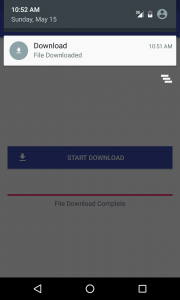
و در آخر پیش نمایشی از برنامه
این آموزش هم به پایان رسید انشاالله مفید بوده باشد.
موفق باشید.






با سلام لینک دانلود فایل اون جایی که نوشتین نیست . اونجا در واقع اسم سایت اصلی هستش که قراره ازش دانلود شه مثلا برای سایت شما اینطوری میشه “http://orjinakteb.com” و لینک بقیه ی دانلود هم توی interface هستش اونجایی که نوشته @GET() حالا سوال من اینه که چجوری بای اونو از acivity گرفت ؟ چون تو اینجا فقط یک فایل خاص رو میشه بهش داد. با تشکر از سایت خوبتون.
سلام بله فایل اصلا وجود ندارد شما باید خودتان بروی سرور خودتان تست کنید و همانطور که در پست توضیح داده شده است شما باید در بخشی فقط اسم فایل و در بخشی دیگر فقط نام سرور یا آیپی یا یا سایت باید قرار گیرد. شما می تونید یک for بزنید و از سرور یک json بگیرید که نام فایل ها را برای شما بر می گرداند سپس می توانید بخش نام فایل را dynamic کنید.
موفق باشید.
با سلام در اندروید ۷ وقتی فایل دانلود میشه در پوشه دانلود تا چند دقیقه چیزی نمایش داده نمیشه. فکر کنم cache میشه که پس از چند دقیقه فایل نمایش داده میشه. ممنون میشم راهنمایی کنید چطوری باید مشکل را حل کرد.
سلام و درود
یکی از مشکلات کتابخانه است چون ابتدا فایل را cache می کند سپس ذخیره می کند باید از کد دیگری استفاده کنید.
موفق باشید.
سلام url های امضا شده از سمت سرور رو چجوری میشه دانلود کرد؟ آخر url هم نوع فایل مشخص نیست که mp4 هست یا png
سلام و درود
با استفاده از متد lastindexof می توانید تشخیص دهید توی url چه نوع فایلی دارید دریافت می کنید.
میخواستم ببینم با کلیک بر روی یک کامپوننت چطوری میتونم از ادامه دانلود جلوگیری کنم؟
سلام و وقت بخیر اگر من بخوام با رتروفیت مثل دانلود منیجر فایلی رو چند تیکه کنم و در آخر همه با هم مرج بشن باید چکار کنم؟