 آموزش برنامه نویسی اندروید |
ارسال Push Notification در اندروید با استفاده از سرویس Firebase یا fcm
سلام دوستان با پست آموزشی ارسال Push Notification در اندروید با استفاده از سرویس Firebase یا fcm در خدمتتون هستیم. وقتی داشتم تو اینترنت سرچ می کردم دیدم کسی آموزش ارسال Push notification رو با استفاده از سرویس گوگل یا همان fcm یا (Firebase Cloud Messaging ) رو نزاشته گفتم برای دوستان گل بزارمش تا ازش استفاده کنن این آموزش بسیار کامل است تا آخر با ما همراه باشید.قبل از انجام تمامی کار های پایین قندشکن رو روشن کنید 🙂
برای شروع کار ما نیاز دارم تا ابتدا پروژه خود را در سایت زیر ثبت کنیم ( نیازی به ساخت اکانت گوگل نیست در صورتی که یکی از آنها را دارید برای ساخت پروژه ابتدا باید شما یک اکانت گوگل داشته باشید.)
https://console.firebase.google.com/
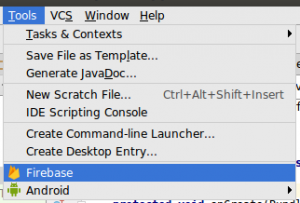
دوستان اگر اندروید استدیو شما ورژن 2.3.3 هست نیازی به انجام موارد بالا نیست فقط کافیست از تب tools قسمت Firebase رو انتخاب کنید عکس زیر برای شما نمایان می شود.
حال شما باید با اکانت خود وارد شودید همانند عکس زیر عمل کنید و روی Connect to Firebase کلیک کنید هم اکنون شما با مرورگر خود به سایت گوگل منتقل پیدا کرده اید و باید اطلاعات حساب کاربری خود را وارد کنید.
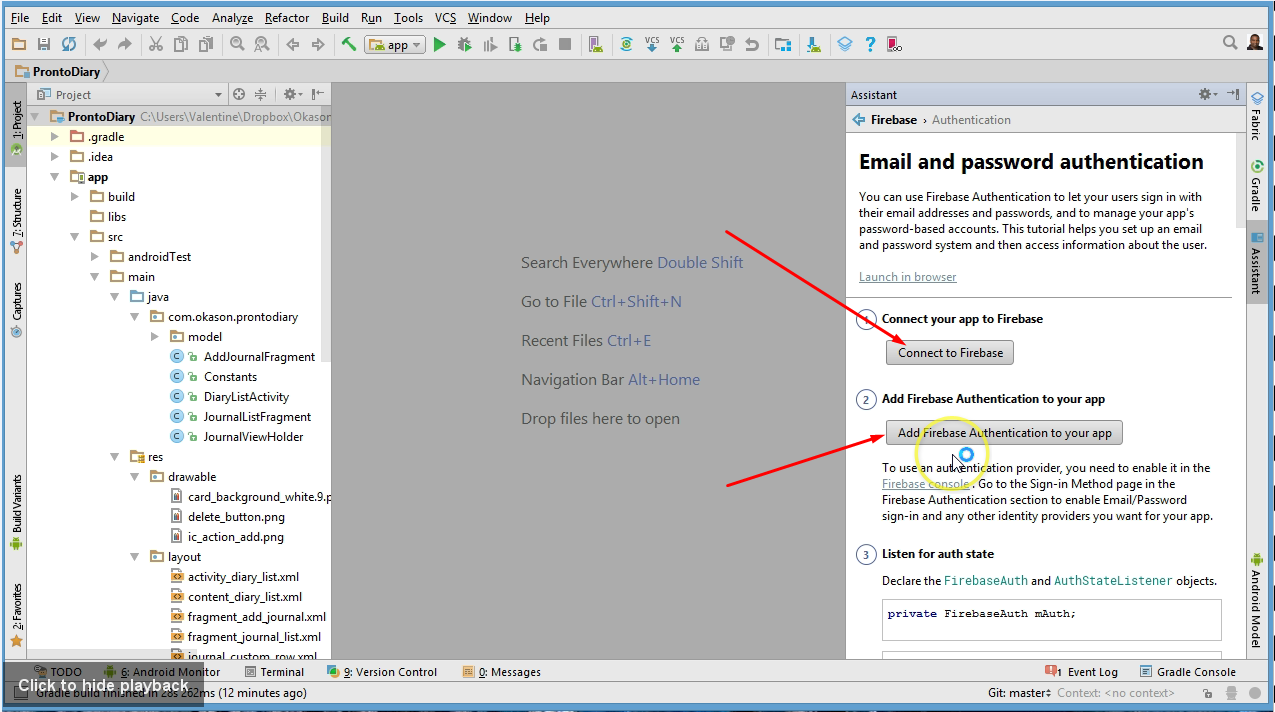
پس از ورود
در قسمت چپ یک پنل برای شما باز می شود همانند زیر
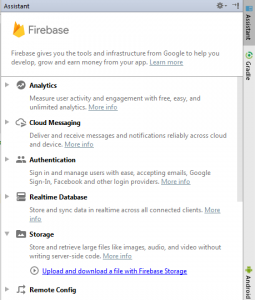
سپس بخش Cloud Messaging رو انتخاب کنید حال عکسی همانند زیر برای شما نمایان می شود.
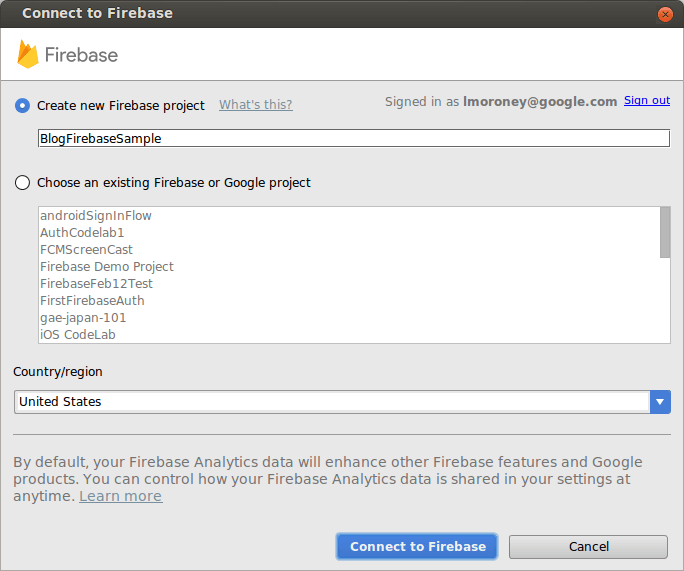
نام پروژه خود در بالا قرار دهید سپس در قسمت پایین کشور خود را ایران قرار دهید سپس Connect to Firebase را بزنید تا به گوگل متصل شوید.
باید کمی صبر کنید تا پروژه شما با گوگل sync شود.بعد از sync شدن زمان اضافه کردن dependencies های fcm به پروژه شما میرسد از سمت راست همان پنل Firebase می توانید این اتصال رو انجام دهید همانند عکس زیر بر روی add Notification to Your app کلیک کنید.
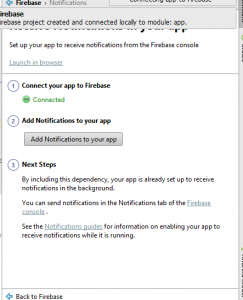
حال صفحه ای همانند زیر برای شما نمایان می شود
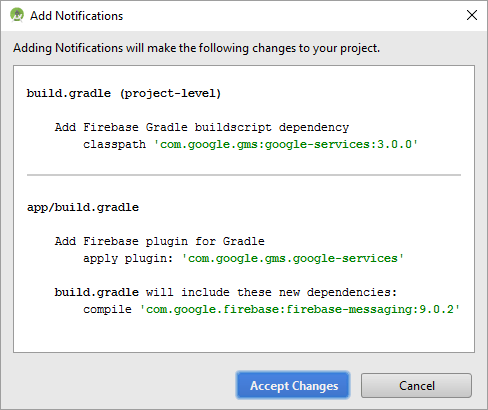
بروی Accept Change کلیک کرده و منتظر sync شدن پروژه بمانید.
خب تا اینجا خوب پیش رفیتم حالا به بخش کد می رویم
یک کلاس به نام Config.java ایجاد کرده کد های زیر را در آن قرار دهید.
/**
 * Created by JFP on 3/18/2017.
 */
public class Config {
    public static final String TOPIC_GLOBAL = "global";
    public static final String REGISTRATION_COMPLETE = "registrationComplete";
    public static final String PUSH_NOTIFICATION = "pushNotification";
    public static final int NOTIFICATION_ID = 100;
    public static final int NOTIFICATION_ID_BIG_IMAGE = 101;
    public static final String SHARED_PREF = "ah_firebase";
}
حال زمان آن می رسد که کلیک یا token کی گوگل برای هر کاربر ارسال می کند را دریافت کرده و در یک جا ذخیره کنیم ما برای ذخیره از Sharedpreference استفاده می کنیم قبلا آموزش داده شده است می تونید از این لینک برای اطلاعات بیشتر استفاده کنید .
یک فایل به نام MyFirebaseInstanceIDService ایجاد کرده کد های زیر را در آن قرار دهید.
import android.content.Intent;
import android.content.SharedPreferences;
import android.support.v4.content.LocalBroadcastManager;
import android.util.Log;
import com.google.firebase.iid.FirebaseInstanceId;
import com.google.firebase.iid.FirebaseInstanceIdService;
/**
 * Created by JFP on 08/08/16.
 */
public class MyFirebaseInstanceIDService extends FirebaseInstanceIdService {
    private static final String TAG = MyFirebaseInstanceIDService.class.getSimpleName();
    @Override
    public void onTokenRefresh() {
        super.onTokenRefresh();
        String refreshedToken = FirebaseInstanceId.getInstance().getToken();
        // Saving reg id to shared preferences
        storeRegIdInPref(refreshedToken);
        // sending reg id to your server
        sendRegistrationToServer(refreshedToken);
        // Notify UI that registration has completed, so the progress indicator can be hidden.
        Intent registrationComplete = new Intent(Config.REGISTRATION_COMPLETE);
        registrationComplete.putExtra("token", refreshedToken);
        LocalBroadcastManager.getInstance(this).sendBroadcast(registrationComplete);
    }
    private void sendRegistrationToServer(final String token) {
        // sending gcm token to server
        Log.e(TAG, "sendRegistrationToServer: " + token);
    }
    private void storeRegIdInPref(String token) {
        SharedPreferences pref = getApplicationContext().getSharedPreferences(Config.SHARED_PREF, 0);
        SharedPreferences.Editor editor = pref.edit();
        editor.putString("regId", token);
        editor.commit();
    }
}
یک فایل به نام MyFirebaseMessagingService ایجاد کرده و کد های زیر را در آن قرار دهید.
import android.content.Context;
import android.content.Intent;
import android.support.v4.content.LocalBroadcastManager;
import android.text.TextUtils;
import android.util.Log;
import com.google.firebase.messaging.FirebaseMessagingService;
import com.google.firebase.messaging.RemoteMessage;
import org.json.JSONException;
import org.json.JSONObject;
/**
 * Created by JFP on 08/08/16.
 */
public class MyFirebaseMessagingService extends FirebaseMessagingService {
    private static final String TAG = MyFirebaseMessagingService.class.getSimpleName();
    private NotificationUtils notificationUtils;
    @Override
    public void onMessageReceived(RemoteMessage remoteMessage) {
        Log.e(TAG, "From: " + remoteMessage.getFrom());
        if (remoteMessage == null)
            return;
        // Check if message contains a notification payload.
        if (remoteMessage.getNotification() != null) {
            Log.e(TAG, "Notification Body: " + remoteMessage.getNotification().getBody());
            handleNotification(remoteMessage.getNotification().getBody());
        }
        // Check if message contains a data payload.
        if (remoteMessage.getData().size() > 0) {
            Log.e(TAG, "Data Payload: " + remoteMessage.getData().toString());
            try {
                JSONObject json = new JSONObject(remoteMessage.getData().toString());
                handleDataMessage(json);
            } catch (Exception e) {
                Log.e(TAG, "Exception: " + e.getMessage());
            }
        }
    }
    private void handleNotification(String message) {
        if (!NotificationUtils.isAppIsInBackground(getApplicationContext())) {
            // app is in foreground, broadcast the push message
            Intent pushNotification = new Intent(Config.PUSH_NOTIFICATION);
            pushNotification.putExtra("message", message);
            LocalBroadcastManager.getInstance(this).sendBroadcast(pushNotification);
            // play notification sound
            NotificationUtils notificationUtils = new NotificationUtils(getApplicationContext());
            notificationUtils.playNotificationSound();
        }else{
            // If the app is in background, firebase itself handles the notification
        }
    }
    private void handleDataMessage(JSONObject json) {
        Log.e(TAG, "push json: " + json.toString());
        try {
            JSONObject data = json.getJSONObject("data");
            String title = data.getString("title");
            String message = data.getString("message");
            boolean isBackground = data.getBoolean("is_background");
            String imageUrl = data.getString("image");
            String timestamp = data.getString("timestamp");
            JSONObject payload = data.getJSONObject("payload");
            Log.e(TAG, "title: " + title);
            Log.e(TAG, "message: " + message);
            Log.e(TAG, "isBackground: " + isBackground);
            Log.e(TAG, "payload: " + payload.toString());
            Log.e(TAG, "imageUrl: " + imageUrl);
            Log.e(TAG, "timestamp: " + timestamp);
            if (!NotificationUtils.isAppIsInBackground(getApplicationContext())) {
                // app is in foreground, broadcast the push message
                Intent pushNotification = new Intent(Config.PUSH_NOTIFICATION);
                pushNotification.putExtra("message", message);
                LocalBroadcastManager.getInstance(this).sendBroadcast(pushNotification);
                // play notification sound
                NotificationUtils notificationUtils = new NotificationUtils(getApplicationContext());
                notificationUtils.playNotificationSound();
            } else {
                // app is in background, show the notification in notification tray
                Intent resultIntent = new Intent(getApplicationContext(), MainActivity.class);
                resultIntent.putExtra("message", message);
                // check for image attachment
                if (TextUtils.isEmpty(imageUrl)) {
                    showNotificationMessage(getApplicationContext(), title, message, timestamp, resultIntent);
                } else {
                    // image is present, show notification with image
                    showNotificationMessageWithBigImage(getApplicationContext(), title, message, timestamp, resultIntent, imageUrl);
                }
            }
        } catch (JSONException e) {
            Log.e(TAG, "Json Exception: " + e.getMessage());
        } catch (Exception e) {
            Log.e(TAG, "Exception: " + e.getMessage());
        }
    }
    /**
     * Showing notification with text only
     */
    private void showNotificationMessage(Context context, String title, String message, String timeStamp, Intent intent) {
        notificationUtils = new NotificationUtils(context);
        intent.setFlags(Intent.FLAG_ACTIVITY_NEW_TASK | Intent.FLAG_ACTIVITY_CLEAR_TASK);
        notificationUtils.showNotificationMessage(title, message, timeStamp, intent);
    }
    /**
     * Showing notification with text and image
     */
    private void showNotificationMessageWithBigImage(Context context, String title, String message, String timeStamp, Intent intent, String imageUrl) {
        notificationUtils = new NotificationUtils(context);
        intent.setFlags(Intent.FLAG_ACTIVITY_NEW_TASK | Intent.FLAG_ACTIVITY_CLEAR_TASK);
        notificationUtils.showNotificationMessage(title, message, timeStamp, intent, imageUrl);
    }
}
حال زمان آن می رسد که دیتا دریافت شده از سرویس fcm را در برنامه handle کنیم یعنی مقدار ها parse کنیم و به صورت یک Notification به کاربر نمایش دهیم.
پس یک کلاس به نام NotificationUtils ایجاد کرده کد های که برای ایجاد notification لازم است را در آن قرار دهید.
package com.jfp.pushnotoficationpart_1;
import android.app.ActivityManager;
import android.app.Notification;
import android.app.NotificationManager;
import android.app.PendingIntent;
import android.content.ComponentName;
import android.content.ContentResolver;
import android.content.Context;
import android.content.Intent;
import android.graphics.Bitmap;
import android.graphics.BitmapFactory;
import android.media.Ringtone;
import android.media.RingtoneManager;
import android.net.Uri;
import android.os.Build;
import android.support.v4.app.NotificationCompat;
import android.text.Html;
import android.text.TextUtils;
import android.util.Patterns;
import java.io.IOException;
import java.io.InputStream;
import java.net.HttpURLConnection;
import java.net.URL;
import java.text.ParseException;
import java.text.SimpleDateFormat;
import java.util.Date;
import java.util.List;
/**
 * Created by JFP on 31/03/15.
 */
public class NotificationUtils {
    private static String TAG = NotificationUtils.class.getSimpleName();
    private Context mContext;
    public NotificationUtils(Context mContext) {
        this.mContext = mContext;
    }
    public void showNotificationMessage(String title, String message, String timeStamp, Intent intent) {
        showNotificationMessage(title, message, timeStamp, intent, null);
    }
    public void showNotificationMessage(final String title, final String message, final String timeStamp, Intent intent, String imageUrl) {
        // Check for empty push message
        if (TextUtils.isEmpty(message))
            return;
        // notification icon
        final int icon = R.mipmap.ic_launcher;
        intent.setFlags(Intent.FLAG_ACTIVITY_CLEAR_TOP | Intent.FLAG_ACTIVITY_SINGLE_TOP);
        final PendingIntent resultPendingIntent =
                PendingIntent.getActivity(
                        mContext,
                        0,
                        intent,
                        PendingIntent.FLAG_CANCEL_CURRENT
                );
        final NotificationCompat.Builder mBuilder = new NotificationCompat.Builder(
                mContext);
        final Uri alarmSound = Uri.parse(ContentResolver.SCHEME_ANDROID_RESOURCE
                + "://" + mContext.getPackageName() + "/raw/notification");
        if (!TextUtils.isEmpty(imageUrl)) {
            if (imageUrl != null && imageUrl.length() > 4 && Patterns.WEB_URL.matcher(imageUrl).matches()) {
                Bitmap bitmap = getBitmapFromURL(imageUrl);
                if (bitmap != null) {
                    showBigNotification(bitmap, mBuilder, icon, title, message, timeStamp, resultPendingIntent, alarmSound);
                } else {
                    showSmallNotification(mBuilder, icon, title, message, timeStamp, resultPendingIntent, alarmSound);
                }
            }
        } else {
            showSmallNotification(mBuilder, icon, title, message, timeStamp, resultPendingIntent, alarmSound);
            playNotificationSound();
        }
    }
    private void showSmallNotification(NotificationCompat.Builder mBuilder, int icon, String title, String message, String timeStamp, PendingIntent resultPendingIntent, Uri alarmSound) {
        NotificationCompat.InboxStyle inboxStyle = new NotificationCompat.InboxStyle();
        inboxStyle.addLine(message);
        Notification notification;
        notification = mBuilder.setSmallIcon(icon).setTicker(title).setWhen(0)
                .setAutoCancel(true)
                .setContentTitle(title)
                .setContentIntent(resultPendingIntent)
                .setSound(alarmSound)
                .setStyle(inboxStyle)
                .setWhen(getTimeMilliSec(timeStamp))
                .setSmallIcon(R.mipmap.ic_launcher)
                .setLargeIcon(BitmapFactory.decodeResource(mContext.getResources(), icon))
                .setContentText(message)
                .build();
        NotificationManager notificationManager = (NotificationManager) mContext.getSystemService(Context.NOTIFICATION_SERVICE);
        notificationManager.notify(Config.NOTIFICATION_ID, notification);
    }
    private void showBigNotification(Bitmap bitmap, NotificationCompat.Builder mBuilder, int icon, String title, String message, String timeStamp, PendingIntent resultPendingIntent, Uri alarmSound) {
        NotificationCompat.BigPictureStyle bigPictureStyle = new NotificationCompat.BigPictureStyle();
        bigPictureStyle.setBigContentTitle(title);
        bigPictureStyle.setSummaryText(Html.fromHtml(message).toString());
        bigPictureStyle.bigPicture(bitmap);
        Notification notification;
        notification = mBuilder.setSmallIcon(icon).setTicker(title).setWhen(0)
                .setAutoCancel(true)
                .setContentTitle(title)
                .setContentIntent(resultPendingIntent)
                .setSound(alarmSound)
                .setStyle(bigPictureStyle)
                .setWhen(getTimeMilliSec(timeStamp))
                .setSmallIcon(R.mipmap.ic_launcher)
                .setLargeIcon(BitmapFactory.decodeResource(mContext.getResources(), icon))
                .setContentText(message)
                .build();
        NotificationManager notificationManager = (NotificationManager) mContext.getSystemService(Context.NOTIFICATION_SERVICE);
        notificationManager.notify(Config.NOTIFICATION_ID_BIG_IMAGE, notification);
    }
    /**
     * Downloading push notification image before displaying it in
     * the notification tray
     */
    public Bitmap getBitmapFromURL(String strURL) {
        try {
            URL url = new URL(strURL);
            HttpURLConnection connection = (HttpURLConnection) url.openConnection();
            connection.setDoInput(true);
            connection.connect();
            InputStream input = connection.getInputStream();
            Bitmap myBitmap = BitmapFactory.decodeStream(input);
            return myBitmap;
        } catch (IOException e) {
            e.printStackTrace();
            return null;
        }
    }
    // Playing notification sound
    public void playNotificationSound() {
        try {
            Uri alarmSound = Uri.parse(ContentResolver.SCHEME_ANDROID_RESOURCE
                    + "://" + mContext.getPackageName() + "/raw/notification");
            Ringtone r = RingtoneManager.getRingtone(mContext, alarmSound);
            r.play();
        } catch (Exception e) {
            e.printStackTrace();
        }
    }
    /**
     * Method checks if the app is in background or not
     */
    public static boolean isAppIsInBackground(Context context) {
        boolean isInBackground = true;
        ActivityManager am = (ActivityManager) context.getSystemService(Context.ACTIVITY_SERVICE);
        if (Build.VERSION.SDK_INT > Build.VERSION_CODES.KITKAT_WATCH) {
            List<ActivityManager.RunningAppProcessInfo> runningProcesses = am.getRunningAppProcesses();
            for (ActivityManager.RunningAppProcessInfo processInfo : runningProcesses) {
                if (processInfo.importance == ActivityManager.RunningAppProcessInfo.IMPORTANCE_FOREGROUND) {
                    for (String activeProcess : processInfo.pkgList) {
                        if (activeProcess.equals(context.getPackageName())) {
                            isInBackground = false;
                        }
                    }
                }
            }
        } else {
            List<ActivityManager.RunningTaskInfo> taskInfo = am.getRunningTasks(1);
            ComponentName componentInfo = taskInfo.get(0).topActivity;
            if (componentInfo.getPackageName().equals(context.getPackageName())) {
                isInBackground = false;
            }
        }
        return isInBackground;
    }
    // Clears notification tray messages
    public static void clearNotifications(Context context) {
        NotificationManager notificationManager = (NotificationManager) context.getSystemService(Context.NOTIFICATION_SERVICE);
        notificationManager.cancelAll();
    }
    public static long getTimeMilliSec(String timeStamp) {
        SimpleDateFormat format = new SimpleDateFormat("yyyy-MM-dd HH:mm:ss");
        try {
            Date date = format.parse(timeStamp);
            return date.getTime();
        } catch (ParseException e) {
            e.printStackTrace();
        }
        return 0;
    }
}
حال زمان ایجاد اکتیویتی اصلی یعنی Mainactivity می شود کد های زیر را در آن قرار دهید.
package com.jfp.pushnotoficationpart_1;
import android.content.BroadcastReceiver;
import android.content.Context;
import android.content.Intent;
import android.content.IntentFilter;
import android.content.SharedPreferences;
import android.os.Bundle;
import android.support.v4.content.LocalBroadcastManager;
import android.support.v7.app.AppCompatActivity;
import android.text.TextUtils;
import android.util.Log;
import android.widget.TextView;
import android.widget.Toast;
import com.google.firebase.messaging.FirebaseMessaging;
public class MainActivity extends AppCompatActivity {
    private static final String TAG = MainActivity.class.getSimpleName();
    private BroadcastReceiver mRegistrationBroadcastReceiver;
    private TextView txtRegId, txtMessage;
    @Override
    protected void onCreate(Bundle savedInstanceState) {
        super.onCreate(savedInstanceState);
        setContentView(R.layout.activity_main);
        txtRegId = (TextView) findViewById(R.id.txt_reg_id);
        txtMessage = (TextView) findViewById(R.id.txt_push_message);
        mRegistrationBroadcastReceiver = new BroadcastReceiver() {
            @Override
            public void onReceive(Context context, Intent intent) {
                // checking for type intent filter
                if (intent.getAction().equals(Config.REGISTRATION_COMPLETE)) {
                    // gcm successfully registered
                    // now subscribe to `global` topic to receive app wide notifications
                    FirebaseMessaging.getInstance().subscribeToTopic(Config.TOPIC_GLOBAL);
                    displayFirebaseRegId();
                } else if (intent.getAction().equals(Config.PUSH_NOTIFICATION)) {
                    // new push notification is received
                    String message = intent.getStringExtra("message");
                    Toast.makeText(getApplicationContext(), "Push notification: " + message, Toast.LENGTH_LONG).show();
                    txtMessage.setText(message);
                }
            }
        };
        displayFirebaseRegId();
    }
    // Fetches reg id from shared preferences
    // and displays on the screen
    private void displayFirebaseRegId() {
        SharedPreferences pref = getApplicationContext().getSharedPreferences(Config.SHARED_PREF, 0);
        String regId = pref.getString("regId", null);
        Log.e(TAG, "Firebase reg id: " + regId);
        if (!TextUtils.isEmpty(regId))
            txtRegId.setText("Firebase Reg Id: " + regId);
        else
            txtRegId.setText("Firebase Reg Id is not received yet!");
    }
    @Override
    protected void onResume() {
        super.onResume();
        // register GCM registration complete receiver
        LocalBroadcastManager.getInstance(this).registerReceiver(mRegistrationBroadcastReceiver,
                new IntentFilter(Config.REGISTRATION_COMPLETE));
        // register new push message receiver
        // by doing this, the activity will be notified each time a new message arrives
        LocalBroadcastManager.getInstance(this).registerReceiver(mRegistrationBroadcastReceiver,
                new IntentFilter(Config.PUSH_NOTIFICATION));
        // clear the notification area when the app is opened
        NotificationUtils.clearNotifications(getApplicationContext());
    }
    @Override
    protected void onPause() {
        LocalBroadcastManager.getInstance(this).unregisterReceiver(mRegistrationBroadcastReceiver);
        super.onPause();
    }
}
و ما فقط یک فایل Layout داریم که به اکتیویتی اصلی مطعلق است و کد ها زیر را در آن قرار دهید.
<?xml version="1.0" encoding="utf-8"?>
<android.support.constraint.ConstraintLayout xmlns:android="http://schemas.android.com/apk/res/android"
    xmlns:app="http://schemas.android.com/apk/res-auto"
    xmlns:tools="http://schemas.android.com/tools"
    android:layout_width="match_parent"
    android:layout_height="match_parent"
    tools:context="com.jfp.pushnotoficationpart_1.MainActivity">
    <TextView
        android:layout_width="wrap_content"
        android:layout_height="wrap_content"
        android:text=""
        android:id="@+id/txt_reg_id"
        app:layout_constraintBottom_toBottomOf="parent"
        app:layout_constraintLeft_toLeftOf="parent"
        app:layout_constraintRight_toRightOf="parent"
        app:layout_constraintTop_toTopOf="parent"
        app:layout_constraintHorizontal_bias="0.731"
        app:layout_constraintVertical_bias="0.52" />
    <TextView
        android:layout_width="wrap_content"
        android:layout_height="wrap_content"
        android:text=""
        android:id="@+id/txt_push_message"
        app:layout_constraintBottom_toBottomOf="parent"
        app:layout_constraintLeft_toLeftOf="parent"
        app:layout_constraintRight_toRightOf="parent"
        app:layout_constraintTop_toTopOf="parent"
        app:layout_constraintHorizontal_bias="0.31"
        app:layout_constraintVertical_bias="0.283" />
</android.support.constraint.ConstraintLayout>
و به مهم ترین بخش برنامه یعنی service می رسیم اگر کد های زیر را در AndroidManifest قرار ندهید اصلا برنامه پیامی رو از سرویس گوگل دریافت نخواهد کرد ! این کد رو باید قبل از بسته شدن تگ Application قرار دهید.
<!-- Firebase Notifications -->
        <!-- too important -->
        <service android:name=".MyFirebaseMessagingService">
            <intent-filter>
                <action android:name="com.google.firebase.MESSAGING_EVENT" />
            </intent-filter>
        </service>
        <service android:name=".MyFirebaseInstanceIDService">
            <intent-filter>
                <action android:name="com.google.firebase.INSTANCE_ID_EVENT" />
            </intent-filter>
        </service>
        <!-- ./Firebase Notifications -->
کار به اتمام رسید انشاالله آموزش کامل و مفیده برای شما بوده باشد.
فقط کد ؟
یک توضیح خشک و خالی هم میدادید که چطور کار میکنه؟ چطور ناتیفیکیشن ارسال کنیم؟
سلام تا 1 ساعت دیگر نحوه ارسال notification رو قرار میدیم یعنی چگونه از طریق سایت console.firebase.com نوتیفیکیشن رو به کاربران broadcast کنید با تشکر از نظرتون و این رو ذکر کنم اولین سایت هستیم که داریم این رو توضیح می دهیم سایت فارسی زبان در این زمینه نداریم !
سلام. ممنون از مطلب مفیدتون
پروژه من با فایربیس sync نمیشه
باید این قسمت رو داخل gradle اضافه کنم تا خطا رفع بشه.چرا؟
repositories { maven { url 'https://maven.google.com' } }سلام آن بخش که باید باشد ربطی به آن قسمت ندارد شما باید قند شکن روشن کنید.
سلام مهندس
ممنون از سایت خوبتون من قبلا هم از آموزش های خوب این وبسایت استفاده کردم
سر این آموزش به مشکلی برخوردم مشکل اینه که وقتی برنامه رو اجرا می کنم با این Firebase Reg Id is not received yet! مواجه می شم ولی نمی دونم چرا می شه بگید مشکلم کجاست؟
من تمام مراحل رو دقیقا همونطوری که گفتید پیش بردم
سلام به تازگی سرویس فایربیس در ایران قطع شده است به خاطر فیلتر از سمت گوگل ولی بعضی از Isp ها نیز این سرویس را فیلتر کرده اند آموزشی برای دور زدن آن قرار می دهیم موفق باشید.
دوستان سلام
کسانی که برای استفاده از منابع jcenter() مشکل دارند با راه حل زیر میتونند مشکل را حل کنند
فقط کافیه در build.gradle (Project: yourProjectName) کد زیر را
jcenter()
با کد زیر جایگزین کنید
jcenter{ url "http://freegoogle.ir/https://jcenter.bintray.com" }
بعد از این دیگه نیازی به زدن وی پی .ان نیست..
ممنون از سایت خیلی خوبتنون،
توابع ایجاد نوتیفیکیشن که در کلاس NotificationUtil هست اصلا اجرا نمی شه!! در واقعا یه بخشی از کد گفتید که اگر برنامه در بکگراند اجرا شده بود خود فایربیس نوتیفیکیشن رو هندل می کنه! می خواستم ببینم که اگر ما بخوایم که تو متن پیام ارسالی یک سری کد هایی بذاریم که تو برنامه بتونیم ترجمش کنیم و طبق اون نوتیفیکیشن پوش کنیم باید چطور باشه؟مثل کد یک محصول و عنوانش رو بفرستیم بعدش تو اپلیکیشن اینهار تفکیک و نوتیفیکیشن رو بسازیم، اینجا تو تا تابع هست به اسم showSmallNotification , showBigNotification که انگار هیچکدوم اجرا نمی شه! می شه لطفا بگید که چکار باید بکنم
سلام
سرویس firebase در ایران غیر قابل استفاده شده است چون توسط کشور های خارجی و 99 درصد Isp های ایران فیلتر شده است در مورد سوالتون شما باید توی onReceive شرط خودتان را قرار دهید.
موفق باشید.
یعنی دیگه کلا خدا حافظ سرویس فایر بیس ؟ ؟؟؟!!!!!
هیچ راهی نداره ؟
با vpn چیزی در برنامه لود کنید میشه هنوز به گونه باهاش کار کرد ولی سیستم stable نمیشه در نظر گرفتش.
چقدر ناامید کننده. برای یک غیرمتخصص که در ابتدای کار چشم در firebase داشت، خیلی سخته.
باسلام و عرض ادب لطفا کمک کنید
من وقتی کدهای زیر رو به مانیفست اضافه میکنم برنامه ران نمیشه و پیغام های زیر رو میده
اینم پیغام ها
E:\projects\bargh\app\build\intermediates\manifests\full\debug\AndroidManifest.xml
Error:(12) error: unknown element found.
Error:(12) error: unknown element found.
Error:(12) unknown element found.
Error:(12) unknown element found.
Error:java.util.concurrent.ExecutionException: java.util.concurrent.ExecutionException: com.android.tools.aapt2.Aapt2Exception: AAPT2 error: check logs for details
Error:java.util.concurrent.ExecutionException: com.android.tools.aapt2.Aapt2Exception: AAPT2 error: check logs for details
Error:com.android.tools.aapt2.Aapt2Exception: AAPT2 error: check logs for details
Error:Execution failed for task ‘:app:processDebugResources’.
> Failed to execute aapt
لطفا کمکم کنید
سلام و درود
بخش Logcat رو بررسی کنید بخشی که خطا داده رو بفرمایید راهنمایی کنیم خطابالا کلی است می توان از هرچیزی باشد یک نمونه اش مشکل در فایل AndroidManifest
موفق باشید.
سلام دوست عزیز
من دقیقا طبق آموزش شما پیش رفتم اما اصلا نوتیفیکیشن دریافت نمیشه
قند شکن هم روشنه
این سرویس در ایران دیگه قابل استفاده نیست.
چقدر میتونم اعتماد کنم به این سرویس؟
الان من یه sample معمولی برای نسخه اولیه اپلیکیشن راه انداختم ولی خب اگر واقعا stable نیست به یک سرویس ایرانی که میشه بهش اعتماد کرد مهاجرت کنم؟
با سلام
با توجه به کار نکردن firebase در ایران ، ما از چه سرویسی برای notification استفاده کنیم؟