 آموزش برنامه نویسی اندروید |
آموزش طراحی متریال دیزاین صفحه ورود و ثبت نام در اندروید
سلام دوستان امیدوارم حالتان خوب باشد در امروز به آموزش طراحی متریال دیزاین صفحه ورود و ثبت نام در اندروید می پردازیم طراحی متریال دیزاین را باید حتما یاد بگیرید حتی اگر برنامه نویسی خوبی باشید تا طراحی متریال دیزاین را به طور اصولی نتوانید پیاده سازی کنید برنامه شما توسط کاربر پذیرفته نمی شود پس باید طراحی متریال دیزاین در برنامه پیاده سازی شده باشد در ادامه می توانید این طراحی متریال دیزاین را مشاهده کنید در ادامه با ما همراه باشید.
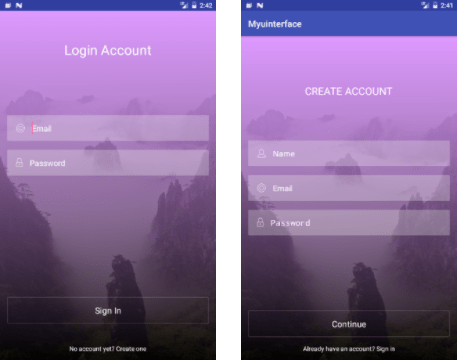
همانطور که مشاهده می کنید همه چیز متریال دیزاین پیاده سازی شده است .
ما فقط به طراحی می پردازیم و به بخش کد جاوا کاری آن چنانی نداریم فقط در بعضی بخش ها رویداد کلیک تعریف شده است که به آنها می پردازیم.
در پوشه drawable یک فایل به نام bgrect.xml ایجاد کرده و کدهای زیر را در آن قرار دهید.
<?xml version="1.0" encoding="utf-8"?>
<shape xmlns:android="http://schemas.android.com/apk/res/android"
    android:shape="rectangle">
    <gradient
        android:startColor="#9000"
        android:endColor="#d9f"
        android:angle="90" />
</shape>
کد بالا مربوط به هر Fram می شود.
یک فایل دیگر در همان پوشه به نام rect.xml ایجاد کرده و کدهای زیر را در آن قرار دهید.
<?xml version="1.0" encoding="utf-8"?>
    <shape xmlns:android="http://schemas.android.com/apk/res/android" android:id="@+id/listview_background_shape">
        <stroke android:width="1dp" android:color="#42ffffff" />
        <padding android:left="1dp"
            android:top="1dp"
            android:right="1dp"
            android:bottom="1dp" />
        <corners android:radius="2dp" />
        <solid android:color="#00000000" />
    </shape>
کد بالا مربوط به رنگ و شکل ظاهری مربوط به EditText است.
یک فایل دیگر به نام rect1.xml ایجاد کرده و کدهای زیر را در آن قرار دهید.
<?xml version="1.0" encoding="utf-8"?>
    <shape xmlns:android="http://schemas.android.com/apk/res/android" android:id="@+id/listview_background_shape">
        <stroke android:width="0dp" android:color="#ffffff" />
        <padding android:left="0dp"
            android:top="0dp"
            android:right="0dp"
            android:bottom="0dp" />
        <corners android:radius="2dp" />
        <solid android:color="#42FFFFFF" />
    </shape>
کد بالا شکل و اندازه مربوط به TextView را تنظیم می کند.
عکس هایی که در این پروژه استفاده شده است به خاطر privacy طراح قرار نمی گیرد می توانید عکس ها را از سایت های مربوط به آیکون و… دانلود کنید.
ابتدا به کدهای مربوط به layout ورود یا login می پردازیم نام این layout برابر با activity_login.xml است.
<?xml version="1.0" encoding="utf-8"?>
<RelativeLayout xmlns:android="http://schemas.android.com/apk/res/android"
    xmlns:tools="http://schemas.android.com/tools"
    android:layout_width="match_parent"
    android:layout_height="match_parent"
    android:background="@drawable/bg">
    <FrameLayout
        android:layout_width="match_parent"
        android:layout_height="match_parent"
        android:background="@drawable/bgrect"
        >
    </FrameLayout>
    <RelativeLayout
        android:layout_width="match_parent"
        android:layout_height="match_parent"
        android:padding="16dp">
        <TextView
            android:id="@+id/terms"
            android:layout_width="wrap_content"
            android:layout_height="wrap_content"
            android:text="Already have an account? Sign in"
            android:textColor="#ffffff"
            android:layout_alignParentBottom="true"
            android:layout_centerHorizontal="true"
            />
        <TextView
            android:id="@+id/create"
            android:layout_width="wrap_content"
            android:layout_height="wrap_content"
            android:text="CREATE ACCOUNT"
            android:textColor="#ffffff"
            android:layout_marginTop="90dp"
            android:textSize="23dp"
            android:layout_centerHorizontal="true" />
        <TextView
            android:id="@+id/conti"
            android:layout_width="match_parent"
            android:layout_height="wrap_content"
            android:text="Continue"
            android:textColor="#ffffff"
            android:textSize="19dp"
            android:layout_above="@+id/terms"
            android:padding="16dp"
            android:gravity="center"
            android:background="@drawable/rect"
            android:layout_marginBottom="16dp"/>
        <LinearLayout
            android:layout_width="match_parent"
            android:layout_height="wrap_content"
            android:orientation="vertical"
            android:layout_marginTop="-05dp">
            <EditText
                android:id="@+id/name"
                android:layout_height="wrap_content"
                android:layout_width="match_parent"
                android:background="@drawable/rect1"
                android:layout_marginTop="220dp"
                android:hint="Name"
                android:textColor="#fff"
                android:textColorHint="#ffffff"
                android:paddingLeft="20dp"
                android:drawableLeft="@drawable/user"
                android:paddingTop="16dp"
                android:paddingBottom="16dp"
                android:drawablePadding="16dp">
            </EditText>
            <EditText
                android:id="@+id/email"
                android:textColor="#fff"
                android:layout_height="wrap_content"
                android:layout_width="match_parent"
                android:background="@drawable/rect1"
                android:layout_marginTop="20dp"
                android:hint="Email"
                android:textColorHint="#ffffff"
                android:drawableLeft="@drawable/email"
                android:paddingLeft="20dp"
                android:drawablePadding="16dp"
                android:paddingTop="16dp"
                android:paddingBottom="16dp"
                >
            </EditText>
            <EditText
                android:id="@+id/pass"
                android:textColor="#fff"
                android:layout_height="wrap_content"
                android:layout_width="match_parent"
                android:background="@drawable/rect1"
                android:layout_marginTop="20dp"
                android:hint="Password"
                android:textColorHint="#ffffff"
                android:inputType="textPassword"
                android:drawableLeft="@drawable/pass"
                android:paddingLeft="20dp"
                android:paddingTop="16dp"
                android:paddingBottom="16dp"
                android:drawablePadding="16dp">
            </EditText>
        </LinearLayout>
    </RelativeLayout>
</RelativeLayout>
پس یک اکتیویتی به این نام LoginActivity.java ایجاد کرده و کدهای زیر را در آن قرار دهید.
package ir.programchi;
import android.content.Intent;
import android.support.v7.app.AppCompatActivity;
import android.os.Bundle;
import android.view.View;
import android.widget.TextView;
public class MainActivity extends AppCompatActivity {
    TextView terms;
    @Override
    protected void onCreate(Bundle savedInstanceState) {
        super.onCreate(savedInstanceState);
        setContentView(R.layout.activity_main);
        terms = (TextView) findViewById(R.id.terms);
        terms.setOnClickListener(new View.OnClickListener() {
            @Override
            public void onClick(View v) {
                Intent intent = new Intent(MainActivity.this,Signin.class);
                startActivity(intent);
            }
        });
    }
}
سپس یک layout برای عضویت درست کرده نام آن برابر با signin.xml است و کدهای زیر را در آن قرار دهید.
<?xml version="1.0" encoding="utf-8"?>
<RelativeLayout xmlns:android="http://schemas.android.com/apk/res/android"
    xmlns:tools="http://schemas.android.com/tools"
    android:layout_width="match_parent"
    android:layout_height="match_parent"
    android:background="@drawable/bg">
    <FrameLayout
        android:layout_width="match_parent"
        android:layout_height="match_parent"
        android:background="@drawable/bgrect"
        >
    </FrameLayout>
    <RelativeLayout
        android:layout_width="match_parent"
        android:layout_height="match_parent"
        android:padding="16dp"
        >
        <TextView
            android:id="@+id/create"
            android:layout_width="wrap_content"
            android:layout_height="wrap_content"
            android:text="No account yet? Create one"
            android:textColor="#ffffff"
            android:layout_alignParentBottom="true"
            android:layout_centerHorizontal="true" />
        <TextView
            android:id="@+id/wolf"
            android:layout_width="wrap_content"
            android:layout_height="wrap_content"
            android:textColor="#ffffff"
            android:textSize="30dp"
            android:text="Login Account"
            android:layout_marginTop="50dp"
            android:layout_centerHorizontal="true"/>
        <TextView
            android:id="@+id/signin"
            android:layout_width="match_parent"
            android:layout_height="wrap_content"
            android:text="Sign In"
            android:textColor="#ffffff"
            android:textSize="19dp"
            android:layout_above="@+id/terms"
            android:padding="16dp"
            android:gravity="center"
            android:layout_alignParentBottom="true"
            android:background="@drawable/rect"
            android:layout_marginBottom="65dp"/>
        <LinearLayout
            android:layout_width="match_parent"
            android:layout_height="wrap_content"
            android:orientation="vertical"
            android:layout_marginTop="-05dp">
            <EditText
                android:textColor="#fff"
                android:id="@+id/email"
                android:layout_height="wrap_content"
                android:layout_width="match_parent"
                android:background="@drawable/rect1"
                android:layout_marginTop="220dp"
                android:hint="Email"
                android:textColorHint="#ffffff"
                android:paddingLeft="20dp"
                android:drawableLeft="@drawable/email"
                android:paddingTop="16dp"
                android:paddingBottom="16dp"
                android:drawablePadding="16dp">
            </EditText>
            <EditText
                android:textColor="#fff"
                android:id="@+id/pass"
                android:layout_height="wrap_content"
                android:layout_width="match_parent"
                android:background="@drawable/rect1"
                android:layout_marginTop="20dp"
                android:hint="Password"
                android:textColorHint="#ffffff"
                android:drawableLeft="@drawable/pass"
                android:paddingLeft="20dp"
                android:drawablePadding="16dp"
                android:paddingTop="16dp"
                android:paddingBottom="16dp">
            </EditText>
        </LinearLayout>
    </RelativeLayout>
</RelativeLayout>
این آموزش هم به پایان رسید.
موفق و پیروز باشید.








سلام اموزش عالی و خوبی بود فقط یه سوال داشتم ما اگر بخوایم اون بگراندمون بره زیر استاتوس بار باید چیکار کنیم یعنی استاتوس بار حذف نشه حالت محو به خودش بگیره
سلام
کد زیر را تست کنید
if (Build.VERSION.SDK_INT >= Build.VERSION_CODES.KITKAT) {
            Window w = getWindow(); // in Activity's onCreate() for instance
            w.setFlags(WindowManager.LayoutParams.FLAG_LAYOUT_NO_LIMITS, WindowManager.LayoutParams.FLAG_LAYOUT_NO_LIMITS);
        }
موفق باشید.
سلام. ممنون از آموزش خوبتون
یه سوال داشتم وقتی از فارسی استفاده میکنم برنامه کند میشه خیلی کند چجوری درستش کنم؟
سلام و درود استفاده از زبان فارسی یا هر زبان دیگیری به کندی برنامه مربوط نمی شود کدها اگر به درستی نوشته نشده باشند باعث کندی برنامه می شوند به طور مثال منتظر ماندن برای نمایش اما به صورت Asynchornize
سلام من خیلی اپلیکیشن سازی چه اندروید چه کامپیوتر چه گیم دوست دارم ولی اصلا حوصله میلیون ها خط کد نویسی خسته کننده رو ندارم میخواستم ببینم براش راه حلی وجود داره یا شما هم همچین کار خسته کننده ای رو میکنید در اخر چیزی مثل ورد پرس برای وب در بخش اندروید هست یا نه ممنونم راهکار بهم بدید
سلام و درود
باید کد نویسی انجام بشه در نهایت چیزی کاستوم اگر بخواید بسازید باید کد نویسی انجام بدید.
موفق و پیروز باشید.
سلام چرا برای من ارور میده